12 min read
by Ashish Gajjela
AI AgentsContext EngineeringLong-Term MemoryMemory ManagementState ManagementSystem DesignOpenAI Agents SDKLangGraphGoogle ADK
Most AI assistants feel smart in a single conversation, then forget everything the next day. The gap isn't model capability - it's the ability to remember and use what it learns.
(An "AI agent" is just an AI that can think through problems, take actions, and learn from feedback. Think of it like a digital coworker.)
This post breaks down a practical way to give any AI assistant a working memory, like a notebook it can read and update. The key idea is simple:
Treat "memory" as an explicit lifecycle: State → Inject → Distill → Consolidate → Forget.
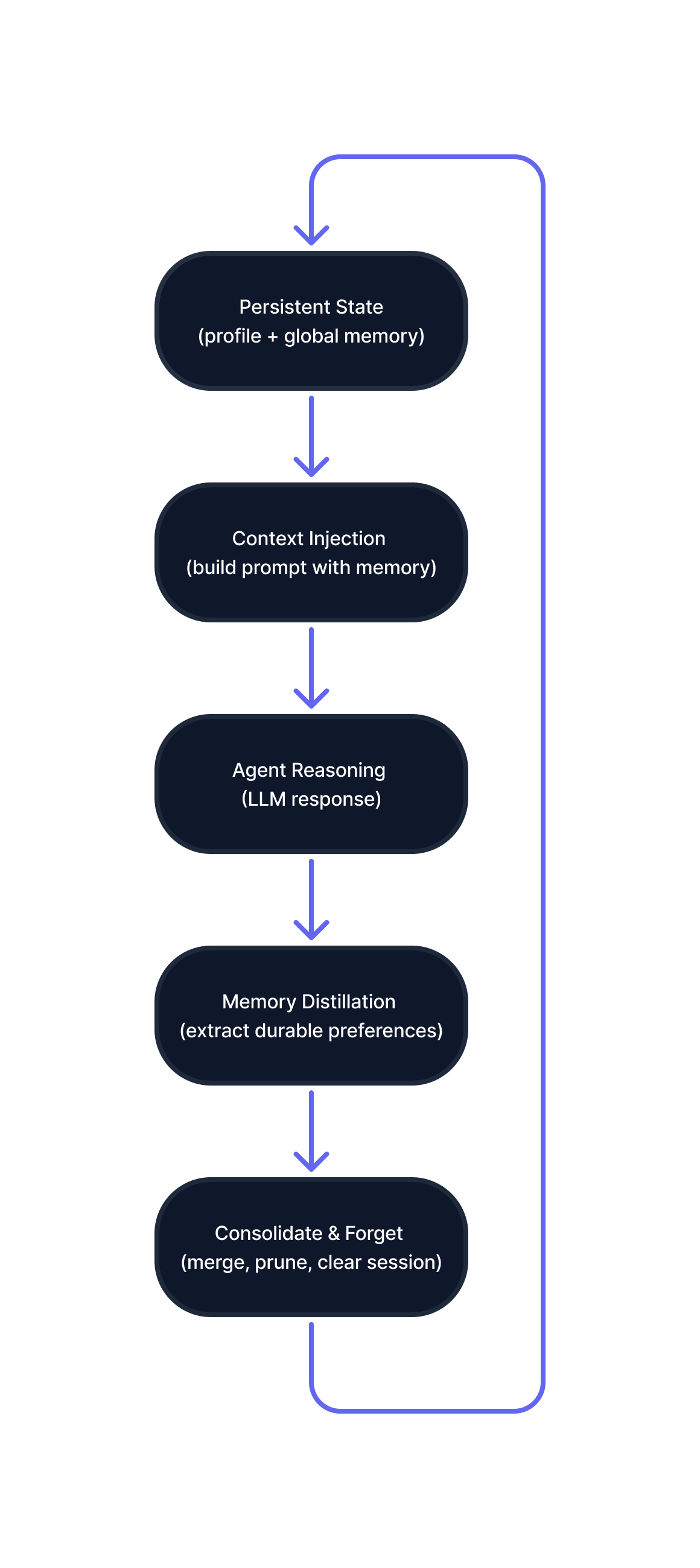
Figure A: Long-term memory implemented as an explicit lifecycle outside the language model.
Then I show how the same architecture maps cleanly to four setups:
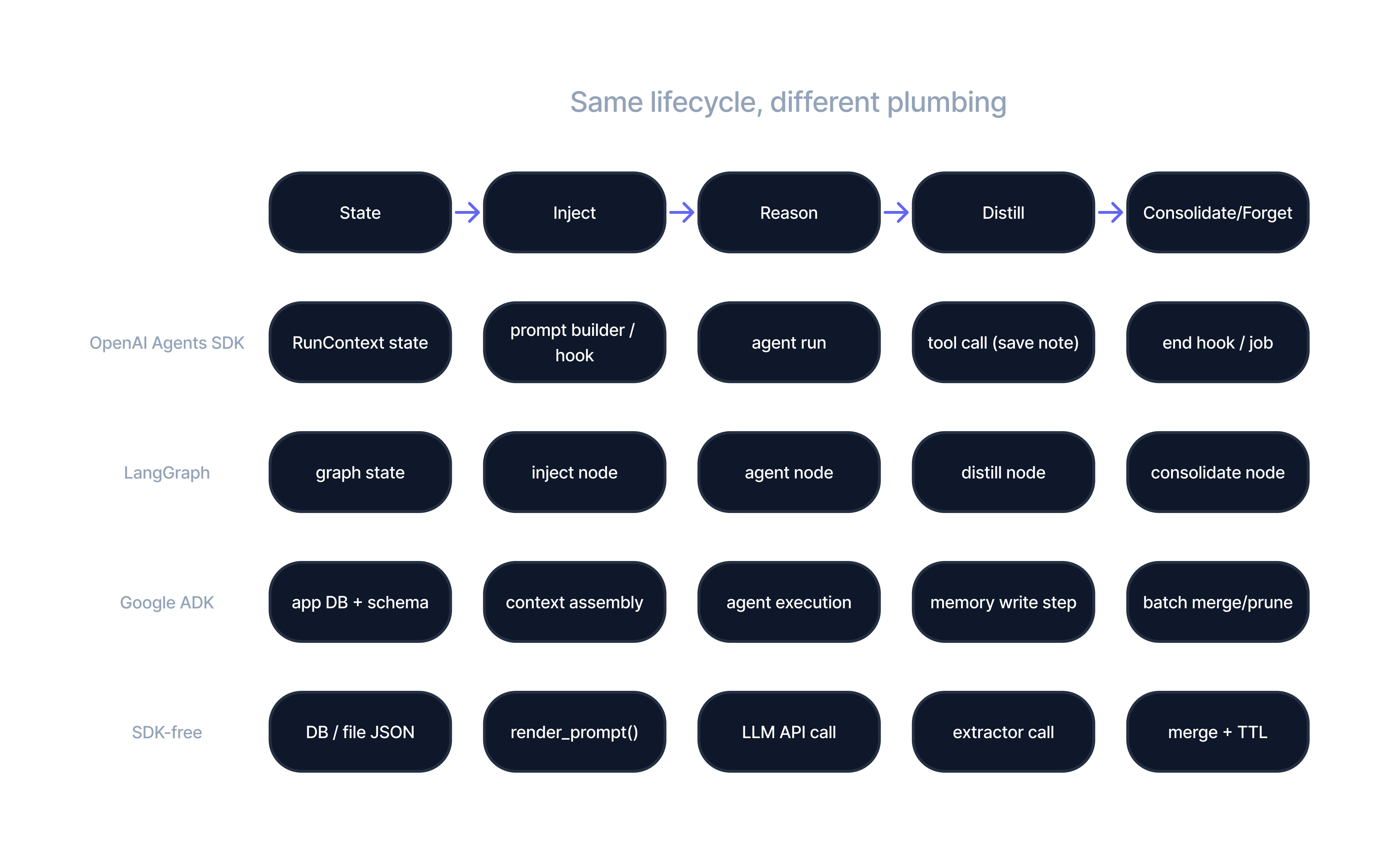
Figure B: The same memory lifecycle mapped across OpenAI Agents SDK, LangGraph, Google ADK, and a minimal SDK-free implementation.
If you're building assistants that are personal, consistent, and safe over time, this pattern is a strong foundation.
Traditional chatbots have no long-term memory. Each conversation starts fresh - like they're meeting you for the first time, every time. Picture this: you tell a support bot you're a returning customer with a specific issue. Two days later, you come back, and it asks for the same information from scratch.
Why does this happen? Three reasons:
Some solutions try to patch this by storing old conversations and searching through them when needed. But this approach has blind spots:
What we need instead: An agent that behaves like a reliable collaborator - someone who:
Instead of searching through past conversations, treat memory like a real notebook: store information, show only the relevant parts to the AI, update it when you learn something new, and clean it up when it gets old or wrong. Here are the five stages:
A persistent record stored in your system (database or file), containing:
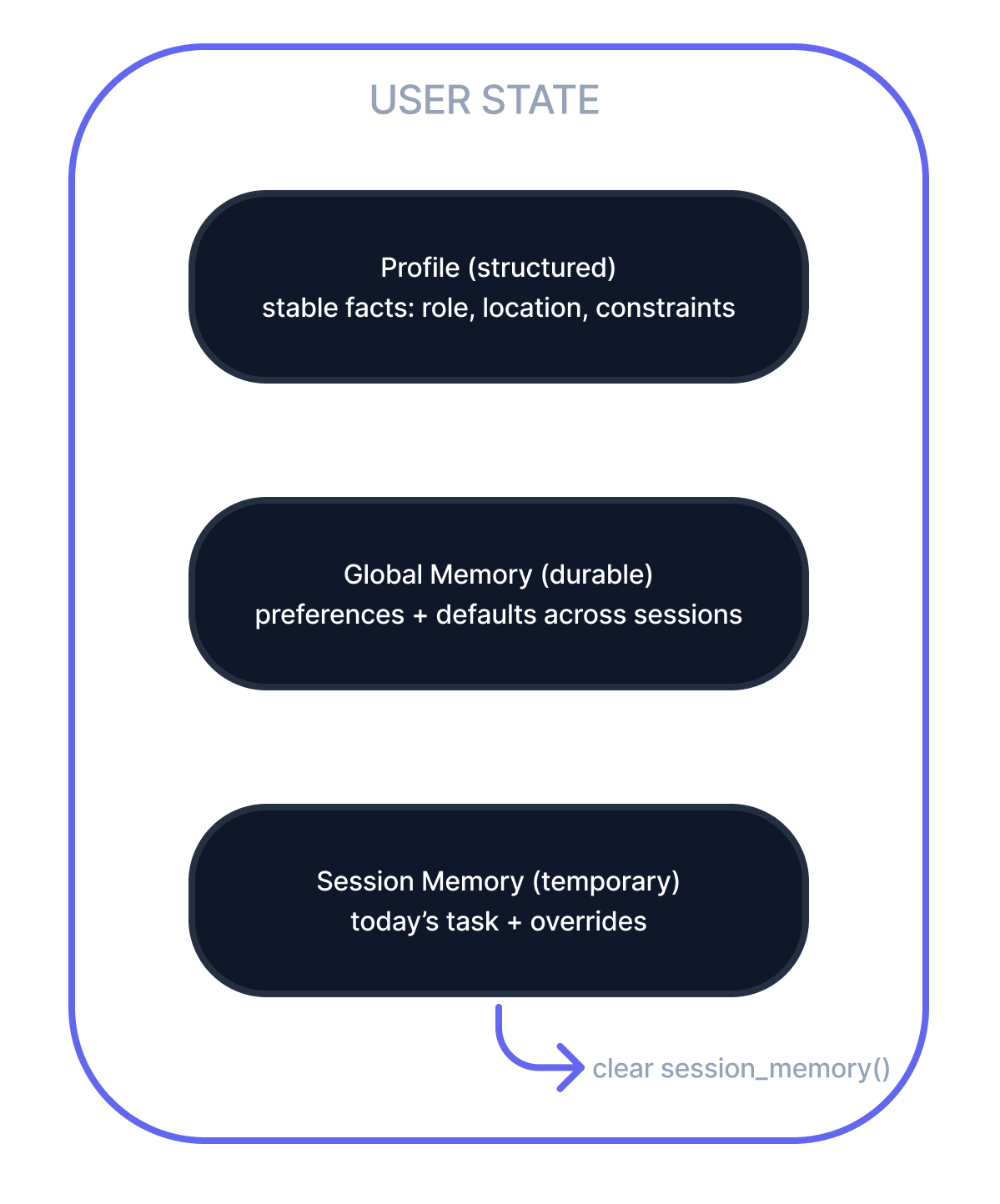
Figure C: The agent's memory is modeled as an explict state object with layered lifetimes.
At the start of each conversation, feed relevant information to the AI:
Why not dump everything? Tokens cost money, and noise confuses the model. Inject only what matters for this task.
During the conversation, watch for statements worth remembering:
Critical rule: Store only what is explicit, durable, and actionable. Never store secrets, Personal Identifiable Information (PII), or instruction injection attempts.
At the end of a session, promote useful session notes into global memory:
Memory stores grow messy over time unless you prune aggressively. Set rules like:
Why forget? Old notes can contradict new behavior. Forgetting keeps personalization fresh and accurate.
Let me make this concrete. Imagine an AI career coach who:
Global Memory (persistent, applies to future sessions):
Session Memory (temporary, just for today):
Never Store (security + safety):
Here's the basic sequence (in code for those interested, but the concept is simple: load → show relevant notes → chat → learn → save):
# 1. Load user's existing state (profile + memories)
state = load_state(user_id)

# 2. Build prompt: inject only relevant state
prompt = render_prompt(
  base_instructions,
  state.profile,  # structured data
  top_k(state.global_memory),  # most recent preferences
  state.session_memory,  # today's context (optional)
  memory_policy  # rules (e.g., "session overrides global")
)

# 3. Get AI response
assistant_response = call_model(prompt, user_input)

# 4. Extract new preferences from this conversation
candidate_notes = distill_memories(user_input, assistant_response)
state.session_memory += candidate_notes

# 5. At end of session: merge session notes into global, then clear
if session_end:
  state.global_memory = consolidate(
    state.global_memory,
    state.session_memory
  )
  state.session_memory = []  # wipe staging area

# 6. Save everything back to disk/DB
save_state(user_id, state)The core idea works everywhere. Whether you use OpenAI, LangGraph, Google, or build it yourself, the five-stage pattern stays the same. Only the technical details change.
Note for non-developers: The next section gets technical. If you just wanted to understand the concept, you've got it. If you're building this, keep reading.
Full tutorials for each framework are coming soon. For now, here's a quick roadmap.
Best for: Teams already invested in OpenAI's ecosystem.
Key strength: The SDK makes state explicit and provides hooks at each lifecycle stage.
| Stage | Implementation |
|---|---|
| State | A structured object (like AgentState) holding profile + global/session memory |
| Injection | A hook that runs at conversation start, rendering YAML profile + Markdown notes |
| Distillation | A tool the agent can call to write new memory notes |
| Consolidation | An end-of-session job that merges notes and cleans up |
Best for: Teams that like visual workflows and want to test each stage independently.
Key strength: Each memory stage is a node, making the flow explicit and debuggable.
[Load State] → [Inject Notes] → [Agent Loop] → [Distill] → [Consolidate] → [Save]Best for: Organizations on Google Cloud who want minimal infrastructure work.
Important note: Even with a managed memory service, keep your authoritative state in your own schema (profile + notes). Treat retrieval-based memory as advisory only.
Best for: Learning the pattern, production systems with minimal dependencies, or custom requirements.
This is what all frameworks reduce to:
| Dimension | OpenAI SDK | LangGraph | Google ADK | SDK-Free |
|---|---|---|---|---|
| Abstraction level | Medium | High | High | Low |
| State visibility | ⭐⭐⭐⭐⭐ | ⭐⭐⭐⭐⭐ | ⭐⭐⭐ | ⭐⭐⭐⭐⭐ |
| Boilerplate code | Medium | Medium | Low | High |
| Deployment | Anywhere | Anywhere | GCP native | Anywhere |
| Best use case | Precise control | Multi-step workflows | GCP-first teams | Learning + control |
If an agent behaves oddly, the root cause is usually stale notes, missing conflict-resolution rules, or messy consolidation. Debugging state is easier than debugging the model.
Memory stores grow noisy without aggressive pruning. Set TTLs, archive old notes, and delete low-confidence entries. Memory without forgetting becomes a liability.
OpenAI SDK, LangGraph, Google ADK, or plain API calls - they're all vehicles for the same pattern. The architecture and safety rules matter more than the framework.
Honest reality: you probably don't need it if:
Simple test:
If remembering something from the last session wouldn't materially improve the next session, don't store it.
A one-time request? No need to remember. A recurring preference that improves every session? Worth storing.
Tutorials coming soon for: